

Browser sync attacks result in business credentials being compromised via personal account and device breaches. Here's what you need to know.
Browser sync attacks result in business credentials being compromised via personal account and device breaches. Here's what you need to know.
One of the breakaway stories of 2026 has been the rise in attacks powered by malicious browser extensions.
Most browser extension attacks are really targeting the apps your users are accessing inside the browser. They do this by intercepting credentials (passwords, session cookies, and so on) as you browse the internet.
This is the same for most browser-based attacks, like phishing (of multiple varieties, with AITM phishing and device code phishing being the most common in 2026), and even hybrid attacks like ClickFix (trick victim into installing an infostealer on their device > steal credentials and cookies > log into apps).
But there’s an often overlooked vector that leads to the same outcome — synced browser profiles. And the most dangerous part of this attack is that it often stems from personal device compromises — naturally, outside the scope of your corporate security software.
Sign into Chrome or Edge with a Google or Microsoft account, and your passwords, bookmarks, history, and extensions follow you seamlessly across every device. For individual users, it's a quality-of-life improvement. But for organisations, it links corporate accounts to personal ones with far weaker security controls.
How browser sync attacks work
When an employee signs into a personal browser profile on a work device (or saves work credentials on a personal device), the browser's sync mechanism copies those credentials into a cloud account outside the organisation's control. That cloud account — typically a personal Google or Microsoft account — becomes the weakest link in the chain.
The typical sequence looks like this:
An employee signs into Chrome with their personal Google account on a corporate laptop. During the course of their work, the browser prompts them to save passwords — for a VPN, an internal tool, a support system, a cloud platform. They click "Save." The credential is now stored locally in the browser and synced to their personal Google account in the cloud.
The personal account is compromised. This can happen in a lot of ways, and is made easier by the less secure nature of personal accounts. They are typically accessed from devices with less or no security protection, while MFA and other identity-layer controls are less common. Once the personal device or account is breached, every synced password — including corporate ones — is in the hands of the attacker.
Personal devices are far softer targets than corporate endpoints. They typically have no EDR agent, no centrally managed antivirus, no hardened configuration baselines, and no security operations team watching for alerts. And personal browsing habits are way more likely to lead to infostealer deployment, which are often distributed through malicious advertisements on all manner of platforms — search results, social media ads, gaming forums, and so on. Notably, the 2025 Verizon DBIR found that 46% of infostealer-infected systems with compromised corporate credentials were non-managed devices.
With the harvested corporate credentials, the attacker authenticates to the organisation's systems. If MFA is absent or bypassable (via fatigue attacks, social engineering, or session token reuse), they're in.
From here, it's a conventional intrusion — privilege escalation, reconnaissance, and exfiltration. But the initial access was entirely outside the defender's visibility. No phishing email hit the corporate mail gateway. No exploit was fired at a corporate asset. The compromise happened in a personal context that security teams had no control over.
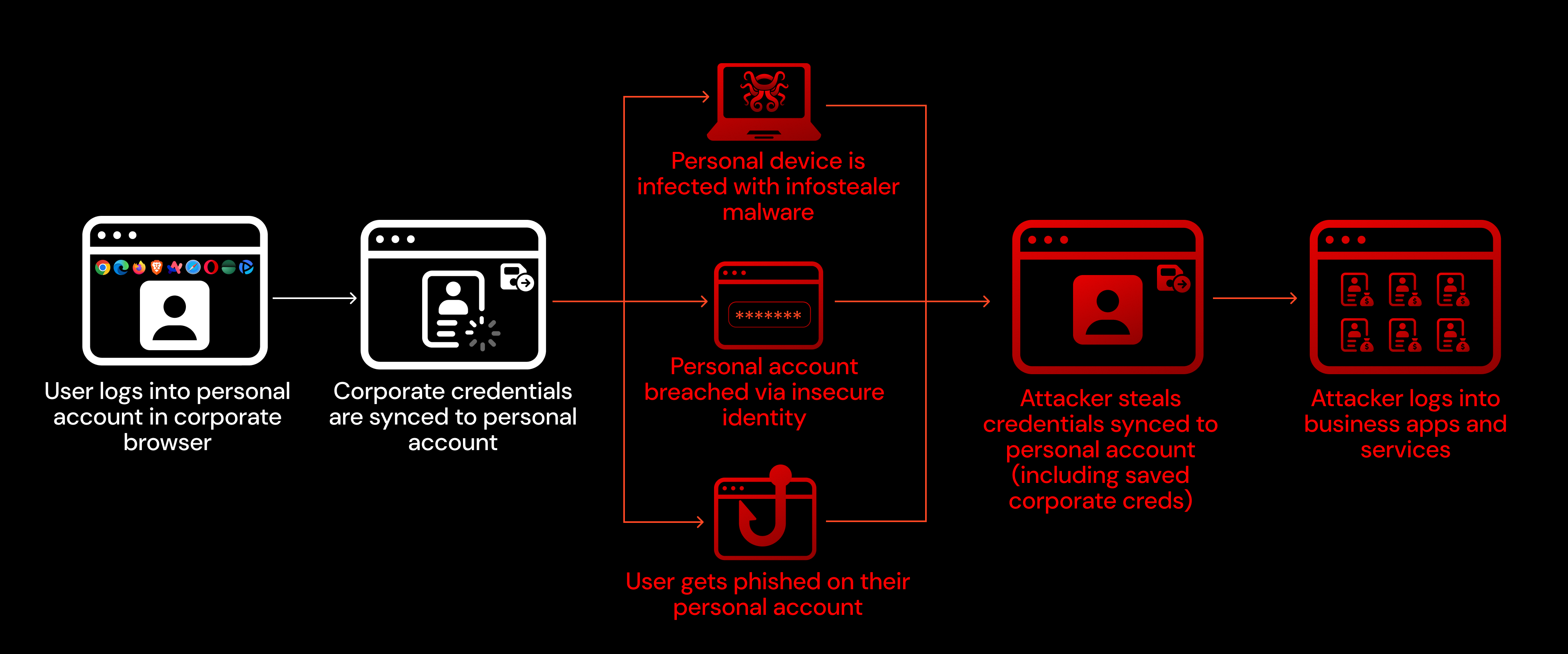
What makes this attack so effective is that it entirely bypasses the corporate security stack. Endpoint detection, email filtering, network monitoring — none of it sees the initial compromise because it happens on a personal device or in a personal cloud account.
The scope isn’t limited to “personal” devices either. BYOD and contractor machines suffer from the same security limitations in that they are a place where personal and corporate use converges, and/or they sit outside of the scope of your security tooling.
Real-world incidents
Cisco (2022)
Cisco was breached by an initial access broker with ties to the Yanluowang ransomware group, UNC2447, and the Lapsus$ threat actor group.
A Cisco employee had enabled Chrome's password syncing feature and had stored their Cisco VPN credentials in the browser. Those credentials were synchronised to their personal Google account. The attacker compromised the personal Google account, obtained the VPN credentials, and then used a combination of voice phishing and MFA fatigue — repeatedly sending push notifications until the employee accepted one — to bypass multi-factor authentication and gain VPN access.
Once inside the network, the attacker escalated privileges, moved laterally to Citrix servers and domain controllers, and deployed offensive tooling consistent with pre-ransomware activity. Cisco's security team ultimately detected and removed the attacker before ransomware was deployed, but the adversary made repeated attempts to regain access in the following weeks, including targeting accounts where employees had only made single-character password changes after the company-wide reset.
Okta (2023)
The Okta breach followed an almost identical pattern to Cisco, but with more severe downstream consequences.
Between September 28 and October 17, 2023, an attacker gained unauthorised access to Okta's customer support case management system. The root cause: an Okta employee had signed into their personal Google profile on Chrome on their Okta-managed laptop. While signed into that personal profile, they accessed a service account for the support system. The service account's username and password were saved by Chrome and synced to the employee's personal Google account.
The attacker — having compromised either the personal Google account or a personal device — obtained these service account credentials and used them to access the support system. The compromised service account had permissions to view and update customer support cases, which contained HAR (HTTP Archive) files uploaded by customers for troubleshooting. Some of these HAR files contained session tokens.
The attacker used the stolen session tokens to hijack the legitimate Okta sessions of five customers, including 1Password, BeyondTrust, and Cloudflare — three security companies that independently detected the suspicious activity and reported it to Okta. In total, files associated with 134 Okta customers were accessed.
What made this breach particularly notable was the detection gap. Okta's security team was unable to identify suspicious file downloads in their logs for 14 days. The attacker navigated directly to the Files tab in the support system rather than opening files through individual support cases, which generated a different log event type that wasn't part of the initial investigation scope. It wasn't until BeyondTrust provided a suspicious IP address on October 13 that Okta was able to correlate the activity.
Snowflake (customers) (2024)
The Snowflake campaign represents what happens when the browser-credential-sync problem meets infostealer malware at scale.
In 2024, a financially motivated threat actor tracked as UNC5537 (associated with the ShinyHunters group) systematically compromised approximately 165 Snowflake customer environments. The attackers didn't exploit any vulnerability in Snowflake itself. They logged in with valid credentials.
Those credentials had been harvested by infostealer malware — including Vidar, RedLine, Lumma, RisePro, Raccoon Stealer, and MetaStealer — from employee and contractor devices over a period stretching back to 2020. Mandiant's investigation found that over 80% of the compromised accounts had prior credential exposure, and critically, the stolen credentials had never been rotated.
The personal/corporate boundary failure was central to the campaign. Mandiant specifically noted that in several cases, the initial infostealer infections occurred on contractor systems that were also used for personal activities, including gaming and downloads of pirated software. These were personal or unmonitored laptops where corporate credentials had been saved in the browser alongside everything else.
The impacted Snowflake accounts lacked MFA (which Snowflake did not enforce by default at the time), and the attackers used a custom tool to automate SQL-based reconnaissance and data exfiltration across customer instances. The stolen data encompassed hundreds of millions of customer records, and at least one victim paid an undisclosed ransom.
What security teams can do about it
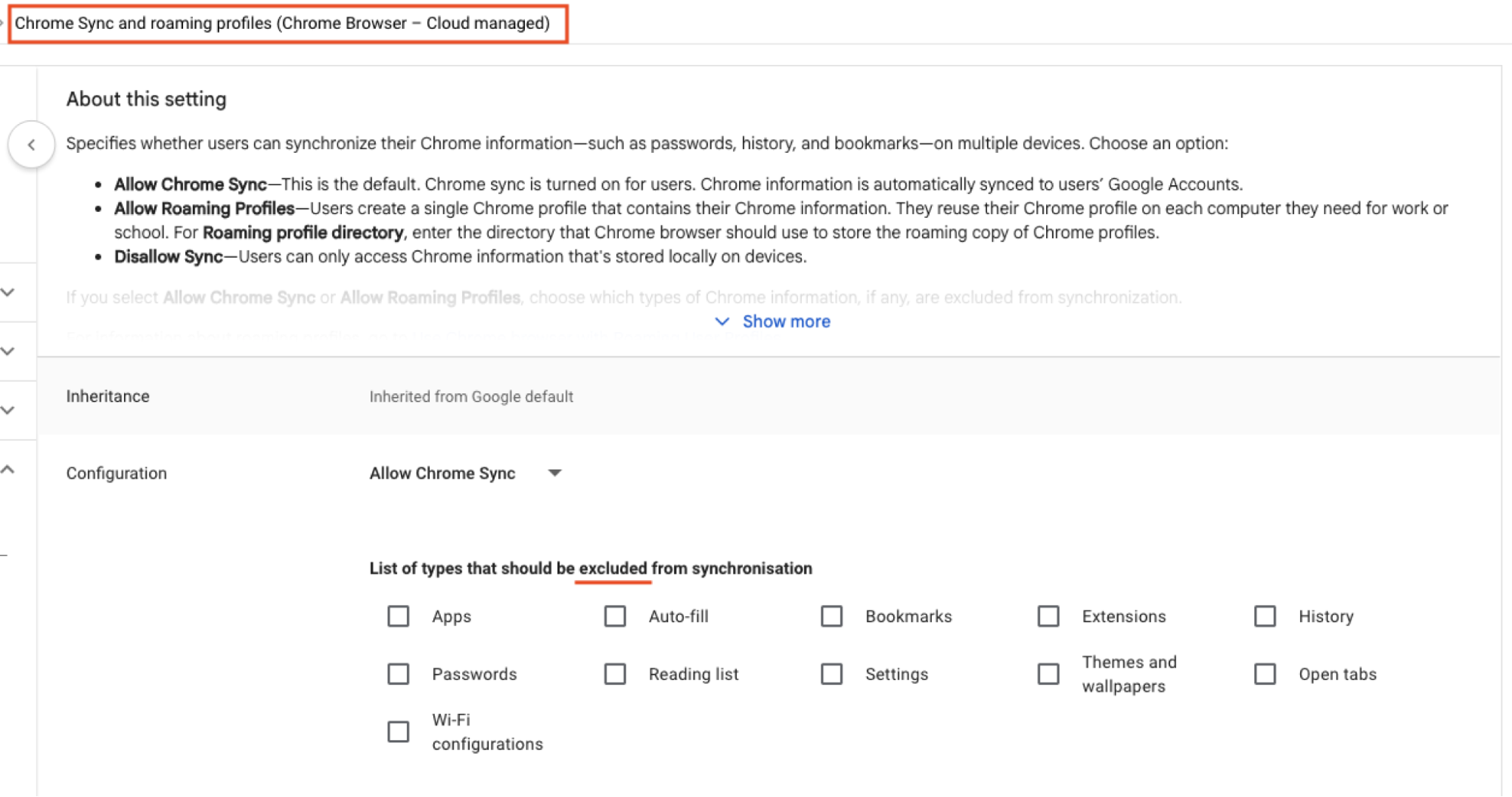
Chrome Enterprise and Microsoft Edge for Business both support policies that prevent employees from signing into personal accounts on corporate-managed browsers. This is the most direct control. It doesn't prevent all credential leakage scenarios, but it closes the sync-to-personal-cloud path.
Every incident described above was enabled or worsened by the absence of MFA on the target system. MFA should be mandatory for all human user accounts, and organisations should audit for "ghost logins" — local username/password accounts that persist alongside SSO and bypass its MFA enforcement.
How Push can help
Push makes browser security easier than ever, particularly when dealing with complex environments running different browsers and operating systems.
You can use Push to surface which users are logged into their browser using a non-work profile and whether the profile is synced across devices. Push captures this information for every browser that your employees are using, including Chrome, Edge, Firefox, Safari, Brave, Opera, Arc, Island, and Prisma (and we’re always adding support for new ones).
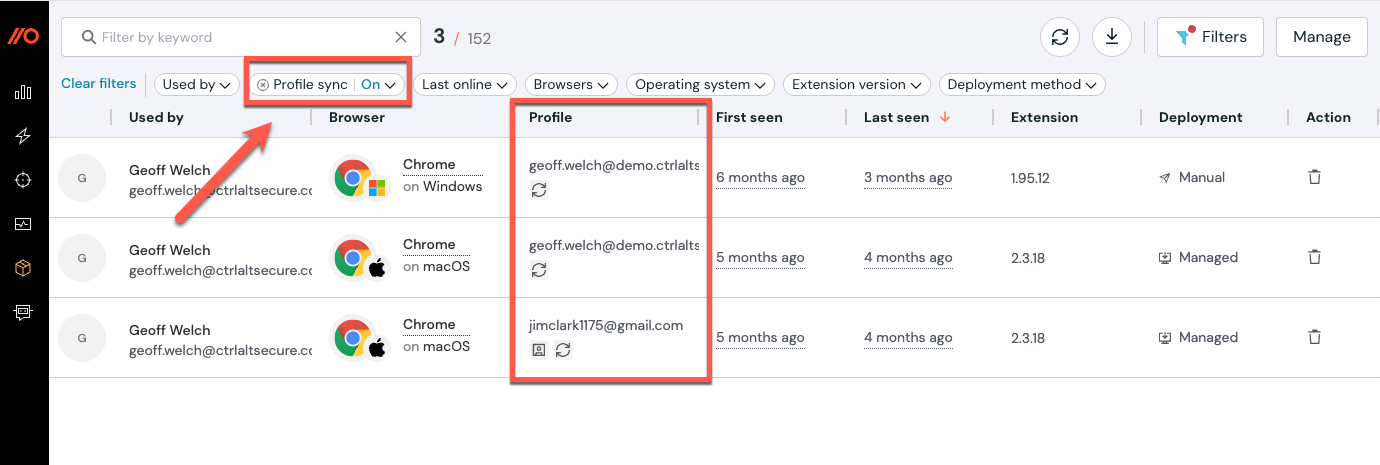
Sync attacks can impact both saved credentials and browser extensions. This means that even if your employees aren’t saving credentials to their browser profile, you can still be at risk if they’ve installed any extensions in another browser where they’re signed in.
To learn more about how you can use Push to lock down extension use and block malicious extensions from running across every browser, check out our guide here.
You can use Push to identify where credentials are being saved — for example, are employees using your company-approved password manager, or copying credentials from unsanctioned apps or locations? This includes where users are manually copying passwords from a password manager app rather than auto-populating (this increases the chance of them entering these passwords into phishing pages).
You can also see where those credentials have a vulnerability, such as a weak, breached, or reused password. In this scenario, we’re looking for credentials that have been leaked online, where an employee is signed into their work browser with a personal account, and profile sync is enabled. This could indicate that the user has been the victim of an infostealer compromise or malicious extension on their personal device.
As well as identifying password vulnerabilities, you can also use Push to harden accounts by detecting MFA gaps and enforcing MFA (even on apps where this isn’t natively possible). Check out our guide for more information.
Stop browser-based attacks with Push
Push Security's browser-based security platform detects and blocks browser-based attacks like AiTM phishing, credential stuffing, malicious browser extensions, ClickFix, and session hijacking. You don't need to wait until it all goes wrong either — you can use Push to proactively find and fix vulnerabilities across the apps that your employees use, like ghost logins, SSO coverage gaps, MFA gaps, vulnerable passwords, and more to harden your attack surface.
To learn more about Push, check out our latest product overview, view our demo library, or book some time with one of our team for a live demo.
